
From Idea to Arcade Game: What Happened When I Built Three Games with AI
Three classic arcade-inspired games, a handful of ideas, some trial and error, and a surprisingly short journey from concept to working software.
What if you could take an idea for a computer game and turn it into something playable in about an hour, without being an experienced game developer?
That was the question I found myself exploring while working on three games for my Gramepa website. I expected an interesting experiment. What I didn’t expect was just how quickly we could move from an idea to a working game, complete with graphics, sound effects, scoring, enemy behaviour and increasingly sophisticated gameplay.
This article documents what we did, what I learned, and why I think the implications extend well beyond retro gaming.

The experiment begins
I’ve been gaming for nearly 50 years, from the early days of Pong and simple home computers to modern open-world games. I’ve also spent time working as an arcade engineer and manager, and taught game and interactive software creation, so I have some understanding of what makes an arcade game tick.
What I don’t do is professionally develop computer games.
I had ideas for some deliberately silly arcade games that would fit the Gramepa brand. Rather than trying to find a suitable existing game or learning a game-development platform from scratch, I decided to see how far I could get by working with AI.
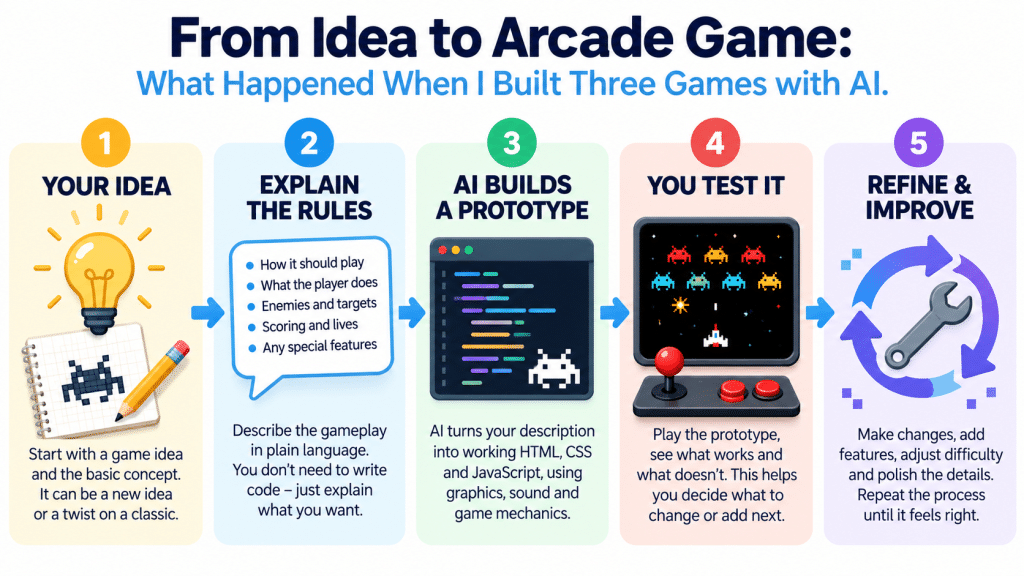
The process was straightforward. I explained the concept, described the gameplay I wanted, and worked with AI to turn those ideas into code. I could then run the game, play it, identify problems and explain what needed changing.
The surprising part was how quickly that feedback loop started producing results.
For each game, we were able to get an initial playable version running surprisingly quickly, in roughly an hour of starting work on it. These were early prototypes, not finished commercial products. The more sophisticated features and refinements came through subsequent testing and development.
Still, getting something playable so quickly was remarkable.
Game one: HEMORRHOIDS
Yes, really. It was never going to be a conventional gaming project.
HEMORRHOIDS was my deliberately ridiculous take on the classic arcade game Asteroids. Instead of piloting a spaceship through an asteroid field, the player controls a flying tube of cream and shoots troublesome blobs.
The basic idea was easy to explain. The challenge was turning it into a game that actually played well.
We developed the core movement and shooting, targets that shrink rather than split, limited supplies of cream, lives represented by replacement tubes, scoring and waves that become progressively more difficult.
We also added synthesised arcade sound effects, a startup sequence, a sound toggle and other details that helped it feel like a proper little arcade game.
The first playable version gave us something tangible to test. Instead of spending days discussing how the game might work, I could play it and say what felt right, what didn’t, and what needed to change.
That became the pattern for the rest of the experiment.
Game two: MY SPACE INVADERS
The second game took a familiar arcade classic and gave it a distinctly modern target.
MY SPACE INVADERS was inspired by Space Invaders, but the invaders represented social media platforms. Facebook, YouTube, TikTok, Pinterest and Instagram formed the attacking ranks, with X appearing as a bonus UFO. The player’s ship was replaced by an old mobile phone, and the projectiles represented posts.
The joke was simple: social media was invading my space.
What interested me most was how quickly we could move beyond the basic idea. We developed the formation of invaders, player movement and shooting, shields, lives, scoring, bonus rewards, animated sprites and sound effects.
We also introduced wave progression and increasing difficulty, so the game became more challenging as the invaders were eliminated.
This was no longer just a screen with a few moving objects. It had rules, progression, feedback and a recognisable arcade rhythm.
And it was still running in a web browser.
Game three: EAR DEFENDER
By the third game, I was beginning to see just how much more ambitious the experiment could become.
EAR DEFENDER took inspiration from the classic arcade shooter Defender, but its purpose was rather different. The player controls a pair of flying ear defenders, protecting cuddly toys from strange sensory intrusions and rescuing toys threatened by enemies called GRABBERs.
We introduced scrolling scenery, a radar, different enemy types, toy abduction and rescue, multiple waves, scoring, sound effects and a special ability called the Quiet Bomb.
Then came the feature that made the game more than a straightforward arcade parody: the SAFE SPACE.
I wanted the player to be able to escape the action and visit a sunny beach. The scene includes blue water, sunshine, boats, a person standing waist-deep in the sea wearing a T-shirt, and a beach towel surrounded by cuddly toys.
When the player escapes, the gameplay pauses. There are no enemies to fight and no pressure to return. The player can stay there until they choose to continue.
We created the beach as part of the game rather than as a separate picture. Its scenery and characters are drawn on screen, with gentle animation to bring the scene to life.
EAR DEFENDER also demonstrated how iterative development could work on a more complex project. We adjusted movement speeds, projectile range, enemy behaviour and difficulty progression. We improved the death animation, introduced two-frame character animations, refined the title screen and added distinct sounds for different events.
Each change could be tested in the game itself.
The result was a much more ambitious project than the original idea suggested.
How did we build them so quickly?
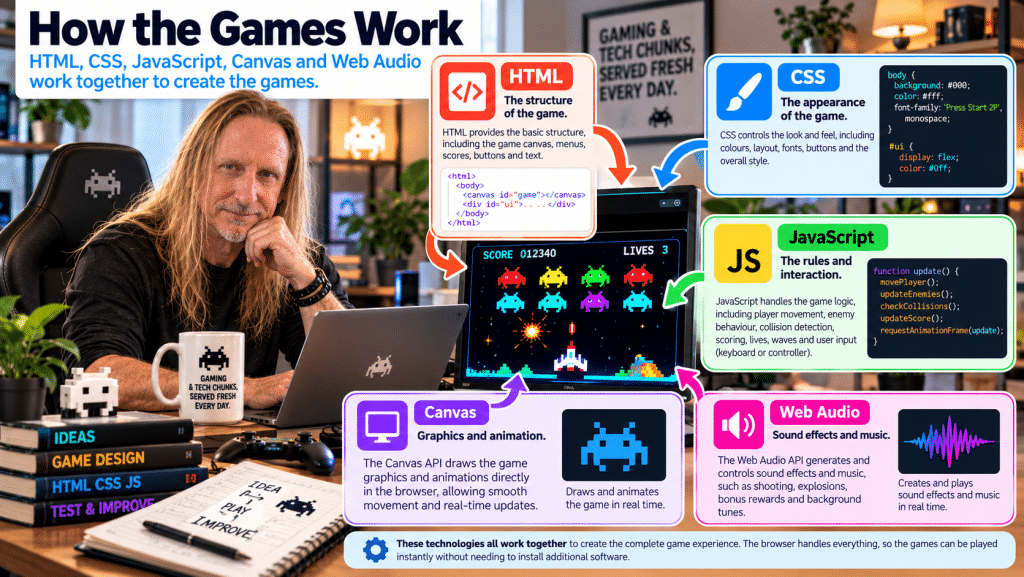
The technical answer is that these games were built using standard web technologies: HTML, CSS and JavaScript.
HTML provides the structure of the page, CSS controls presentation, and JavaScript handles the logic and interaction. The games use the browser’s Canvas API to draw graphics and animations, while the Web Audio API can generate and control sound effects.
These are established web technologies, not a special game-development system invented for this experiment. The MDN Canvas API documentation explains how the browser can draw graphics and animations, while its Web Audio API documentation describes how sound can be generated and processed.
For our games, much of the code could be kept together in a single HTML file. That made it convenient to run a standalone version, test changes and keep a working copy before integrating the game into WordPress.
But the technology alone doesn’t explain the speed.
The real advantage came from combining my ideas and feedback with AI’s ability to generate and modify code rapidly.
What did AI actually contribute?
I didn’t need to specify every line of code or explain every technical detail.
I could describe the game I wanted and explain its rules in ordinary language. AI could then translate those requirements into a working implementation.
Where I supplied the direction and the intended behaviour, AI helped with the programming: movement calculations, collision detection, animation, scoring, sound generation and the many small rules that make a game behave properly.
I was also impressed by how readily it could work with established game concepts. I could refer to familiar arcade mechanics, such as the scrolling world in Defender or the formation and wave progression of Space Invaders, without having to explain every underlying programming technique.
The AI could draw on established programming patterns and game-development knowledge to help implement those ideas. I still needed to explain the particular behaviour I wanted, especially when our games deliberately departed from the originals.
This is an important distinction. AI wasn’t reading my mind, and it didn’t automatically produce a perfect game from a vague request. It gave us a very fast way to turn a reasonably clear description into something we could test.
The real breakthrough was the feedback loop
The most valuable part of the experiment wasn’t the initial code generation. It was what happened afterwards.
A traditional beginner might spend a considerable amount of time learning the tools, writing code and trying to understand why something wasn’t working before reaching the point where a game could be played.
Our approach was different:
- Describe the idea. Explain the game, its rules and the intended experience.
- Build a playable version. Get the basic mechanics working as quickly as possible.
- Test it. Play the game and see how it behaves in practice.
- Identify problems. Explain what is too fast, confusing, missing or simply not fun.
- Refine it. Modify the code and test again.
That cycle could be repeated many times.
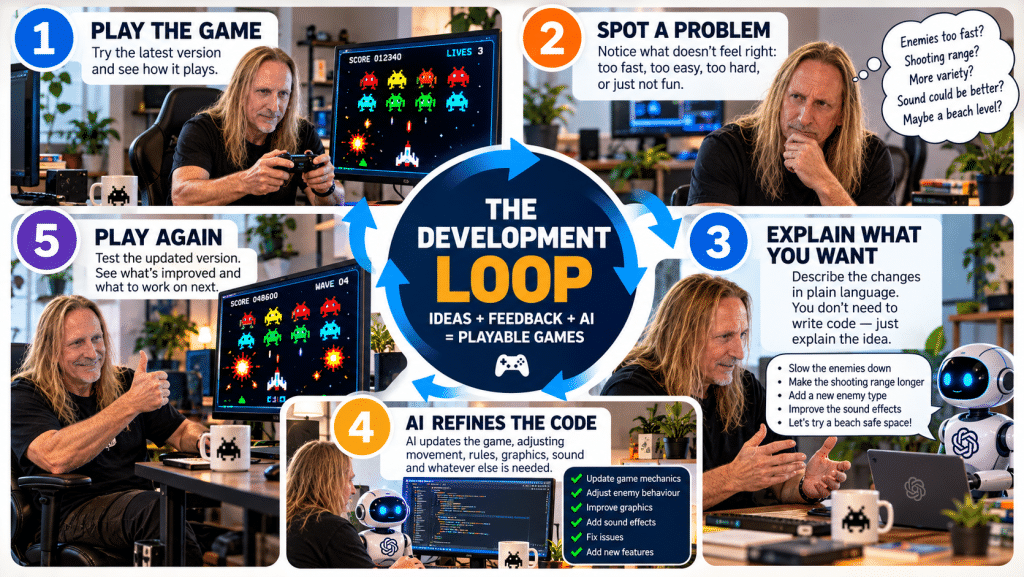
For example, it was much easier to judge whether a projectile travelled too far once I had played the game than it would have been to settle the perfect value in advance. Likewise, the two-frame character animations in EAR DEFENDER became an obvious improvement once we could see them in action.
The game itself became the means of deciding what to build next.
We weren’t trying to get everything right before we started. We were creating something we could learn from.
Did I need technical knowledge?
Yes and no.
I didn’t need to know how to write all the JavaScript required for a scrolling arcade game. But my existing knowledge of gaming helped enormously.
I understood the difference between a game that was technically working and one that felt right. I could recognise when movement was too fast, when a familiar mechanic behaved incorrectly, when difficulty progression needed adjustment and when a visual change improved the experience.
I also needed to explain what I wanted clearly, test the results and make decisions about which changes mattered.
In other words, I contributed the ideas, the context, the judgement and the feedback. AI helped translate those requirements into code.
That doesn’t mean technical knowledge is irrelevant. Understanding more about programming makes it easier to diagnose problems, evaluate code and recognise when a solution needs more work. Nor does a successful prototype automatically mean that the code is secure, accessible, maintainable or ready for every device.
But the experiment demonstrated that a person doesn’t necessarily have to master an entire technical discipline before beginning to build something useful.
Why does this matter beyond gaming?
This is where things become particularly interesting for FRUKit.
The same basic approach could apply to many other kinds of software.
Imagine a small business owner who needs a simple booking tool, a calculator for a specialised task, a customer questionnaire, a stock-management aid or a dashboard to make sense of information.
Previously, the owner might have had to find an existing product, learn a development platform or pay someone to build a solution before they could even see whether the idea was worthwhile.
With AI-assisted development, it may be possible to create a small working prototype quickly, test it against the real requirement and improve it through feedback.
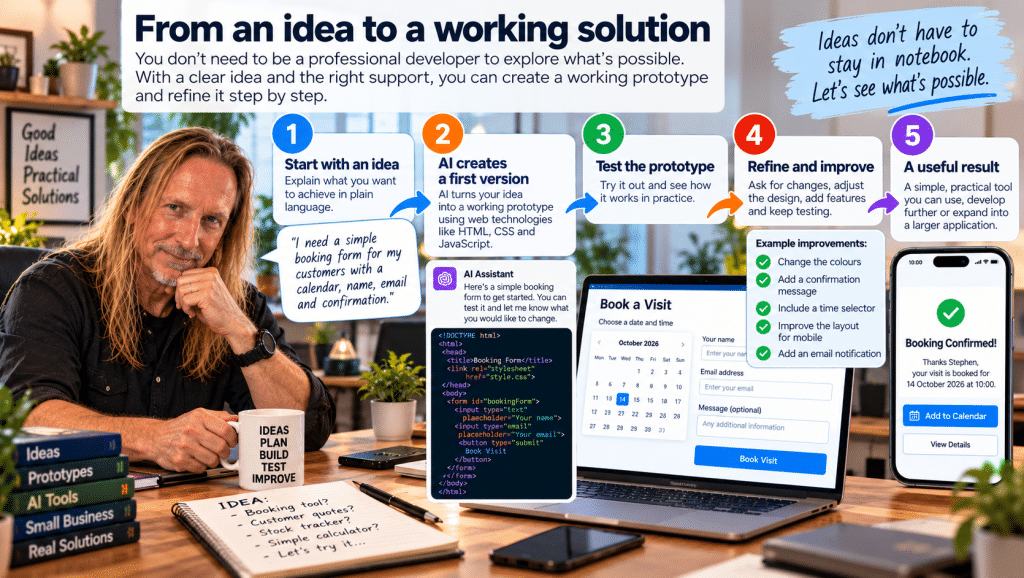
The important word is prototype. Not every idea needs a large software project to discover whether it has value.
A small, working example can help answer practical questions: Does this solve the problem? Is it easy to use? What have we overlooked? Is it worth developing further?
That could be useful for small businesses, personal projects, educational tools and many other applications.
It could also help people communicate their requirements. A working example is often much easier to discuss than an abstract description of what a future application might do.
What about apps and more ambitious projects?
The games have made me think seriously about what might be possible next.
Browser-based software can already do far more than display static pages. Modern web technologies support graphics, animation, sound, interactive controls and data handling. Depending on the requirements, browser-based applications can be a practical way to deliver useful tools without immediately committing to a separate desktop or mobile application.
However, there is an important difference between building a small game and developing a production application.
A commercial app may require user accounts, secure storage, databases, payments, synchronisation, privacy controls, accessibility, testing across devices and ongoing maintenance. A quick prototype doesn’t make those responsibilities disappear.
AI can help with parts of that work, but each component still needs to be designed, tested and reviewed appropriately.
The lesson isn’t that every application can be built in an hour. It’s that the time and effort needed to explore an idea may be much smaller than we once assumed.
That changes the economics of experimentation. More ideas can be tested before deciding which ones deserve a larger investment.
What I’ve learned
Three games have given me a practical demonstration of how AI-assisted development can work.
I’ve learned that a clear idea can become a playable prototype surprisingly quickly; that ordinary language can be an effective way to describe many programming requirements; and that testing and feedback are essential to turning a basic result into something more polished.
I’ve also learned that the human contribution remains important. The tools can help write the code, but someone still needs to decide what is worth building, what good looks like, and whether the result genuinely does what it is supposed to do.
For me, this has been more than an exercise in making silly arcade games. It has been a way to explore a new working method, learn through experimentation and discover where AI can help turn ideas into practical results.
And it has left me wondering what else we can build.
The next project might be another game. It might be a small business tool, an interactive learning resource or something I haven’t thought of yet.
That’s the exciting part: we don’t have to know the final destination before we start exploring.
This experiment is ongoing. I’ll be documenting what we build, what works, what doesn’t, and what I learn along the way.
Have an idea you’d like to explore?
You don’t need to know exactly how to build it before you start. If you have a practical problem, a small-business idea or a repetitive task you’d like to make easier, FRUKit can help you explore the possibilities and work out what makes sense.
Get in touch to discuss your idea.
FRUKit — making technology easier to understand, one practical experiment at a time.